A booking system that knows what is actually free
Live availability, turnaround time between hires, and a calendar that stays in step wherever the booking came from.
No monthly subscription to start: two plans lower your costs as you grow.
How booking works
Customers pick a date, a time or a period, see what is genuinely available, and book and pay in one flow. Availability is calculated from your real stock minus everything already reserved, including turnaround time, so the same object cannot be promised twice.
The hard part of rental booking is not the calendar. It is the gap between hires. Most double bookings do not come from two customers picking the same slot; they come from an object being marked available at the moment it is due back rather than the moment it is ready to go out again.
Buffer time closes that gap. You set it per category, so a bike returning at 13:00 becomes bookable at 13:30 and a campervan needs a full changeover day, and the calendar stops making promises your counter cannot keep.
The booking engine
- Live availability calculated from real stock, not a separate calendar you have to maintain.
- Hourly, half-day, daily, weekly and multi-week hire periods on the same objects.
- Buffer and turnaround time per category, so returns are not instantly rebookable.
- Time slots you define yourself, for businesses where the day is not an open calendar.
- Minimum and maximum hire periods, and changeover days where they apply.
- Accessories and add-ons booked on the same order, with their own stock.
- Calendar sync, so bookings appear where your team already looks.
- Bookings from your own site, a shared link, or a SitePack site, all against the same availability.
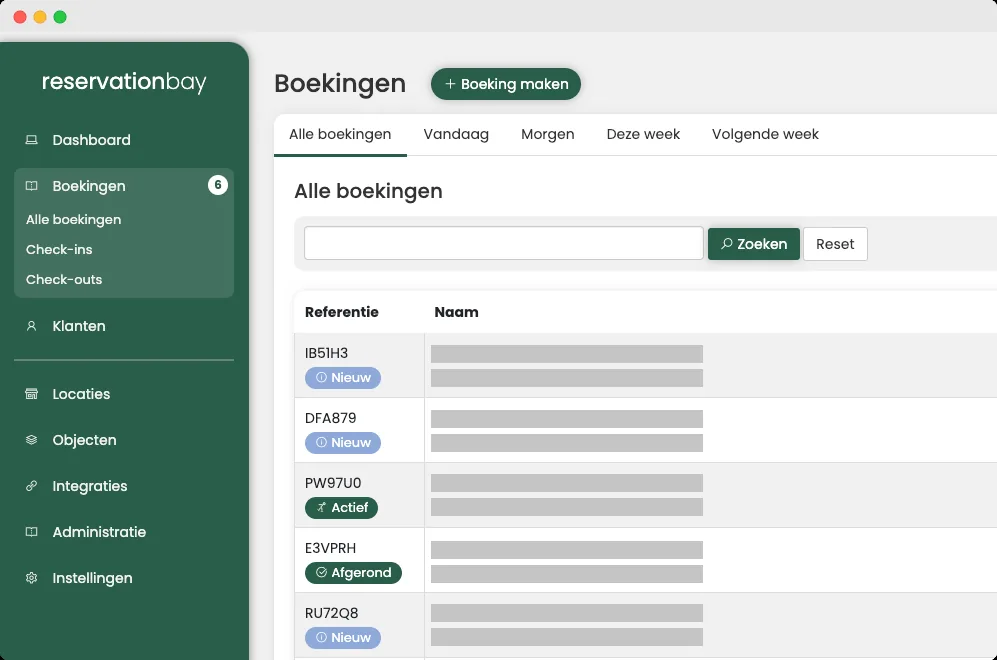
What the booking list looks like
Every booking in one place, with its reference, its status and where it sits in the day.
Filters for today, tomorrow, this week and next sit above the list, because the question at the counter is almost never "all bookings".
What a customer actually does
- Pick a periodThey choose a date, slot or range and immediately see what is free. No enquiry form, no waiting for a reply.
- Choose the objectThey pick a category or a specific object, plus any accessories, with stock checked as they go.
- Sign and payThe rental contract and any waiver are signed electronically, and payment plus deposit are taken in one step.
- Get confirmationThey receive the booking and documents, and can find them again in the customer portal without emailing you.
What booking connects to
Frequently asked questions
How do you prevent double bookings?
Availability is calculated from actual stock minus every existing reservation, in real time, and buffer time keeps an object from being rebookable the instant it is due back. There is no nightly sync to fall behind.
Can I set turnaround time between hires?
Yes, per category. Thirty minutes for a bike, a full changeover day for a campervan, whatever the object actually needs to be ready.
Can customers book by the hour?
Yes. Hourly, half-day, daily, weekly and multi-week periods are all supported on the same objects, with different rates per period.
Do I need a website for this?
No. You can share a booking link, embed the flow in a site you already have, or build one in SitePack if you have none.
Does it sync with my calendar?
Yes. Bookings can appear in the calendar your team already uses, so nobody has to check two places.
Stop taking bookings by phone
Create a free account, add an object and take a test booking through the whole flow.